Description
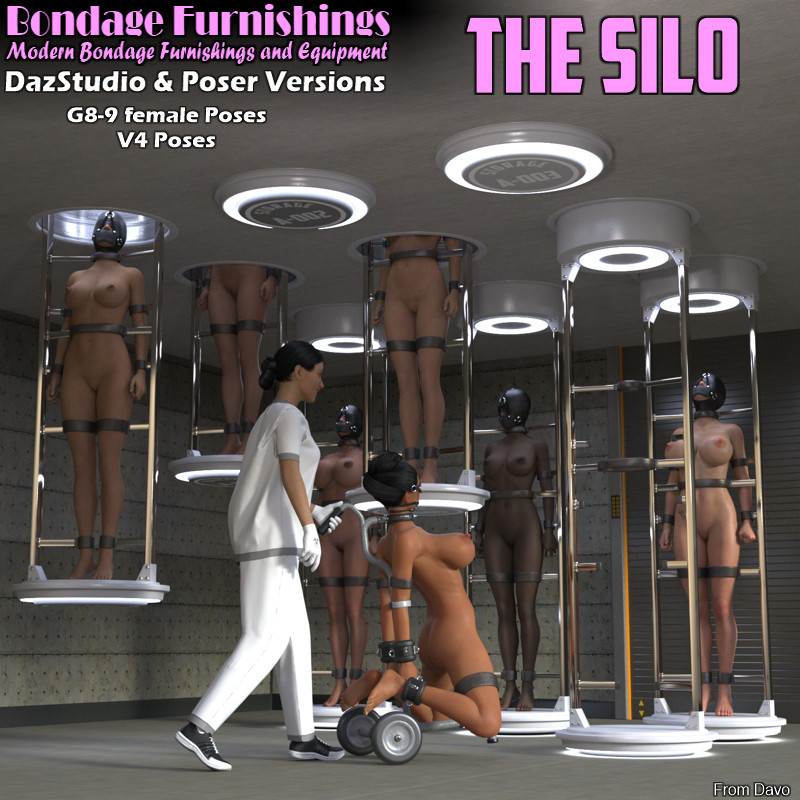
Product:"Bondage Furnishings" The Silo for Daz Studio and Poser
Vendor/Creator: Davo or Davorama
store support forum: https://www.renderotica.com/community/forums.aspx?g=topics&f=2878
Copyright (c) 2025 davo. All rights reserved. Not intended for redistribution.
-----------------------------------------------------------------------------------------------------------------------------------
Keep your characters neatly tucked away and out of site.
-----------------------------------------------------------------------------------------------------------------------------------
SPECIAL NOTE 1: Posing for Genesis 8/9/V4 figures is based on the STANDARD, NON-MORPHED OR ALTERED figures. If you have applied morphs or altered body shapes or proportions, you must manually adjust the character and device positions if connection points are not touching. If you do have to alter the poses, you can do this to one side of the device and one side of your character then use the symmetry command to mirror the result to the other side.
Genesis 9 figure should have the female body shape morph applied before posing.
-----------------------------------------------------------------------------------------------------------------------------------
SPECIAL NOTE 2: Iray is the render engine of choice for Daz Studio, Firefly for Poser
-----------------------------------------------------------------------------------------------------------------------------------
Daz Studio System Requirements:
- PC and Mac compatible
- Requires Daz Studio 4+ (created using Daz Studio 4.2)
- - All files in .duf, .ds*, .png and .jpg format.
Poser System Requirements:
- PC and Mac compatible
- Should be backwards compatible to poser 9 or poser pro 2012
- All files in .obj, .cr2, .png and .jpg format.
- Poses included for V4.2
----------------------------------------------------------------------------------------------------------------------------------
Descriptions below pertain to Daz Studio. Poser version is similar in looks and function with slightly different folder structuring.
----------------------------------------------------------------------------------------------------------------------------------
Package Features:
- Silo: This is a generic ceiling figure with a silo tube centered in the ceiling. There are an additional 8 cutouts in the ceiling for the addition of more Silo Xtra figures. The 'cage' of the silo moves up and down and has a repositionable neck and hip straps. There are repositionable armatures on the right and left side of the cage platform, these have length morphs and are meant to pose into the straps and your genesis characters basic body bands, which are also included.
Pose files for G8F,G9F, V4 and matching poses for the cage is supplied.
- Silo Xtra: This is an additional Silo tube with cage that can be added to the Silo figure if you move the ceiling cut outs out of the way or hide them.
There is pre-assembled ceiling with additional Silo tube already provided.
- Silo 3 and 9 Sets: This is a Silo figure with Silo Xtra figures already positioned and parented for your convenience.
- READ FIRST icon: This icon will pop up notes pertaining to the folder contents when double clicked. Please read these icons to answer most questions.
----------------------------------------------
Cuffs Basic Bands library
----------------------------------------------
These body bands are a wearable preset (conforming figure in poser) that you apply to your character like clothing. The bands are on the upper arms, wrists, thighs and legs. These will deform with your characters body shapes to a certain degree. Select your character in the scene then apply the body bands. There is a folder for visibility options that will show or hide sets of the bands on the arms and legs.
Crosstie folders: These folders have some smart prop crossties for the arms and legs. The arms and legs options will partially pose only the arms or legs. The difference between option A and B is that the A option has the cross ties slightly on the outside of cuffs for better visibility. The B options has them more centrally between the cuffs. The crosstie prop has size and shape morphs for custom looks.
----------
Pose Libraries:
-----------
Note: Posing for Genesis 8/9/V4 figures is based on the STANDARD, NON-MORPHED OR ALTERED figures. If you have applied morphs or altered body shapes or proportions, you must manually adjust the character and device positions if connection points are not touching. If you do have to alter the poses, you can do this to one side of the device and one side of your character then use the symmetry command to mirror the result to the other side. Genesis 9 base figure should have the female body shape dialed in before applying poses.
READ FIRST ICONS: Pose folders have READ FIRST icons that contain important information pertaining to posing, required cuffs and parenting. Please read these icons for important information!
-----------------------------------------------------------------------------------------------------------------------------------
A more detailed readme file is included with the product zip files.
Application Compatibility
| Other Notes |
| (Products created/rigged in Poser 2012 and Daz Studio 4.21) |
Figure Compatibility
| Daz Figures | Generation 4 | Victoria 4 |
| | Genesis 8 | Genesis 8 Female |
| | Genesis 9 | Genesis 9 Female |
| Other Notes |
| (Devices are fully poseable to accomodate any figure, poses provided are for figures listed.) |
Product Requirements
| Other Notes |
| (G8 and G9 base figures are free at Daz3d.com) |
| V4 Morphs ++ | (V4 AND M4 Base are available at Daz3d) |