Options
Go to last post Go to first unread
RangerRabbit  
#1 Posted : Friday, October 4, 2024 1:17:44 PM(UTC)
RangerRabbit

Rank: Administration

Joined: 12/23/2019(UTC)
Posts: 290

Thanks: 76 times
Was thanked: 367 time(s) in 166 post(s)

Small changes sometimes have the biggest impact.


We have begun making changes to our Catalog Categories. This should help make things easier to locate. If you are looking for anything that will work with a specific model, like a G9F or G9M character, now you can click the Model Compatibility option for the model you are looking for and be presented with ALL products that will work with that model. You can also select multiple options by using the Advanced Search feature.


Advanced Search


Select from the Right Menu for the Category choices;


Make more than one choice:


This is a work in progress, so only the newest products are being added to these new Categories, but we will continue to work on editing the previously released products to bring them into the new category list. 

Edited by user Sunday, April 27, 2025 6:46:26 PM(UTC)  | Reason: Not specified

RangerRabbit attached the following image(s):
Screenshot 2024-10-04 131111.jpg
Screenshot 2024-10-04 130923.jpg
Screenshot 2024-10-04 131037.jpg
RangerRabbit
Renderotica Management
thanks 1 user thanked RangerRabbit for this useful post.
ZenMaster3D on 10/11/2024(UTC)
fred333  
#2 Posted : Saturday, October 5, 2024 3:51:46 AM(UTC)
fred333

Rank: Newbie

Joined: 11/21/2017(UTC)
Posts: 7

This explains why it is broken. I try searching for Poser content only and I get lots of items that won't work with Poser. The search is broken.
RangerRabbit  
#3 Posted : Saturday, October 5, 2024 4:24:02 PM(UTC)
RangerRabbit

Rank: Administration

Joined: 12/23/2019(UTC)
Posts: 290

Thanks: 76 times
Was thanked: 367 time(s) in 166 post(s)

Originally Posted by: fred333 Go to Quoted Post
This explains why it is broken. I try searching for Poser content only and I get lots of items that won't work with Poser. The search is broken.


I'm not sure how you are "Searching" for Poser content, since there are multiple ways to search for items in the Catalog. You could use the Content Preferences on the left menu, (these don't work well if the vendor doesn't apply the proper Preferences when creating their product page). You could use the word Poser in the Keywords search field and just click Search. But then you'll get things that may have the poses in it as it returns all items that are "relevant" in that they contain most of what you have asked for. Another way is to use the Categories from the left menu and drill down to the specific type of product you are looking for. Now that we have added new categories, and they will only apply to the newest releases, you'll have to drill down into the "Legacy Categories" and look for Poser specific models. The last way to do a search is to use the Advanced Search and from the far right menu, choose the categories that you are looking for. We are moving towards a fix that has been needed forever, on how the search function will return ALL comics as either Daz or Poser compatible. Which of course, they aren't. All our comic use Adobe Reader. 


So, the search is no more broken now than it has been for years, but we are trying to resolve some of the issues by setting up a category system that will help resolve the confusion that our search can't fix on it's own.


RangerRabbit
Renderotica Management
fred333  
#4 Posted : Thursday, October 24, 2024 4:08:52 AM(UTC)
fred333

Rank: Newbie

Joined: 11/21/2017(UTC)
Posts: 7

so, prior to the change I was able to go into Catalog, Advanced Search, Software and choose Poser and get a list of Poser related items.  Post the change, doing the same thing, only 3 out of the first 100 items are Poser related and not the first three either.  That to me suggests it's broken when before it wasn't.


RangerRabbit  
#5 Posted : Thursday, October 24, 2024 6:10:55 PM(UTC)
RangerRabbit

Rank: Administration

Joined: 12/23/2019(UTC)
Posts: 290

Thanks: 76 times
Was thanked: 367 time(s) in 166 post(s)

Originally Posted by: fred333 Go to Quoted Post


so, prior to the change I was able to go into Catalog, Advanced Search, Software and choose Poser and get a list of Poser related items.  Post the change, doing the same thing, only 3 out of the first 100 items are Poser related and not the first three either.  That to me suggests it's broken when before it wasn't.


At the moment, the Advanced Search has stopped working. We are looking into this to determine why and hope to have it working properly again soon. In the meantime, here are some instructions on how to search for Poser only products using the left menu, Refine By selections.


Click on the +REFINE BY link under the title "3d Content", to open the dropdown menu. 


Choose Poser under Software preferences then click the OK button to the right.


Next, collapse the dropdown menu by clicking on the -REFINE BY link.


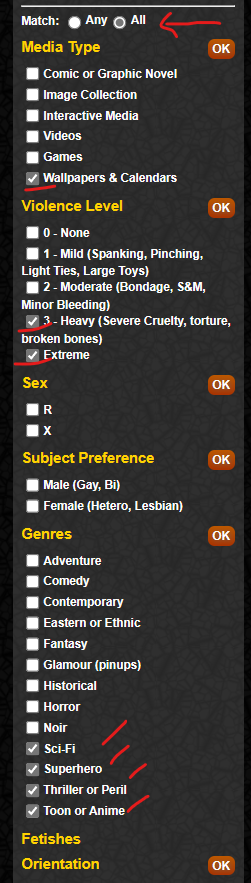
You will notice that the displayed products will have changed, but you will also still see Comics in the mix. These aren't supposed to be doing this and we are also working on fixing this part of the search as well. So to ensure the comics are removed, 


Expand the dropdown menu by clicking the +REFINE BY under the Comics, Artwork & Games title.


Then select Match: All


Then select a number of random check boxes. By selecting Match All, it will be looking for all comics that have ALL of the preferences turned on, so by choosing a number of checkboxes that don't go together, you should be able to exclude ALL the comics. Below is an example of the selections I made to remove the comics from my display.

Edited by user Thursday, October 24, 2024 6:13:35 PM(UTC)  | Reason: Not specified

RangerRabbit attached the following image(s):
Screenshot 2024-10-24 180737.png
Screenshot 2024-10-24 180912.png
RangerRabbit
Renderotica Management
Users browsing this topic
Guest
Forum Jump  
You cannot post new topics in this forum.
You cannot reply to topics in this forum.
You cannot delete your posts in this forum.
You cannot edit your posts in this forum.
You cannot create polls in this forum.
You cannot vote in polls in this forum.

Powered by YAF.NET | YAF.NET © 2003-2026, Yet Another Forum.NET
This page was generated in 0.102 seconds.

Notification

Icon
Error