Renderotica
»
Store Products
»
Product Support
»
DoctorPervic
»
How To Get The Water To Show In A Barnyard Barrel?
Rank: Advanced Member
Joined: 5/20/2020(UTC)
Posts: 64
Was thanked: 25 time(s) in 24 post(s)
|
One of the promos of the Barnyard product depicts a model standing in one of the barrels with water in the barrel. I would like to create a similar scene.
In the Surfaces tab for the barrel prop, I can see a "water" texture. What I would like to know is how to make the water visible? The barrel prop doesn't have a separate surface for the top of the barrel. The only separate surfaces I can see are the barrel itself and the metal bands.
Is there a way to accomplish this?
|
|
|
|
|
|
Rank: Advanced Member
Joined: 9/15/2012(UTC)
Posts: 452
Was thanked: 346 time(s) in 200 post(s)
|
If there is no surface, you could use DS to create a cylinder primitive, position it, scale the y axis till it's pretty flat and apply one of DS's iray liquid or glass materials.
|
|
|
|
|
|
Rank: Advanced Member
Joined: 5/20/2020(UTC)
Posts: 64
Was thanked: 25 time(s) in 24 post(s)
|
Thanks, Davo- I hadn't thought about doing that! I'll give that a try.
|
|
|
|
|
|
Rank: Advanced Member
Joined: 9/15/2012(UTC)
Posts: 166
Thanks: 121 times
Was thanked: 80 time(s) in 65 post(s)
|
Don't own this but find it strange that it is featured heavily in the promos if not an option. One of the promos shows a sealed barrel and open barrel with water. The ReadMe says there are two barrel props. Are they both sealed?
|
 1 user thanked haruchai for this useful post.
|
|
|
|
Rank: Advanced Member
Joined: 12/10/2017(UTC)
Posts: 63
Thanks: 24 times
Was thanked: 13 time(s) in 12 post(s)
|
Hi everyone. I do apologize if I did not specify this properly in any documentation. I should probably update the product with better info.
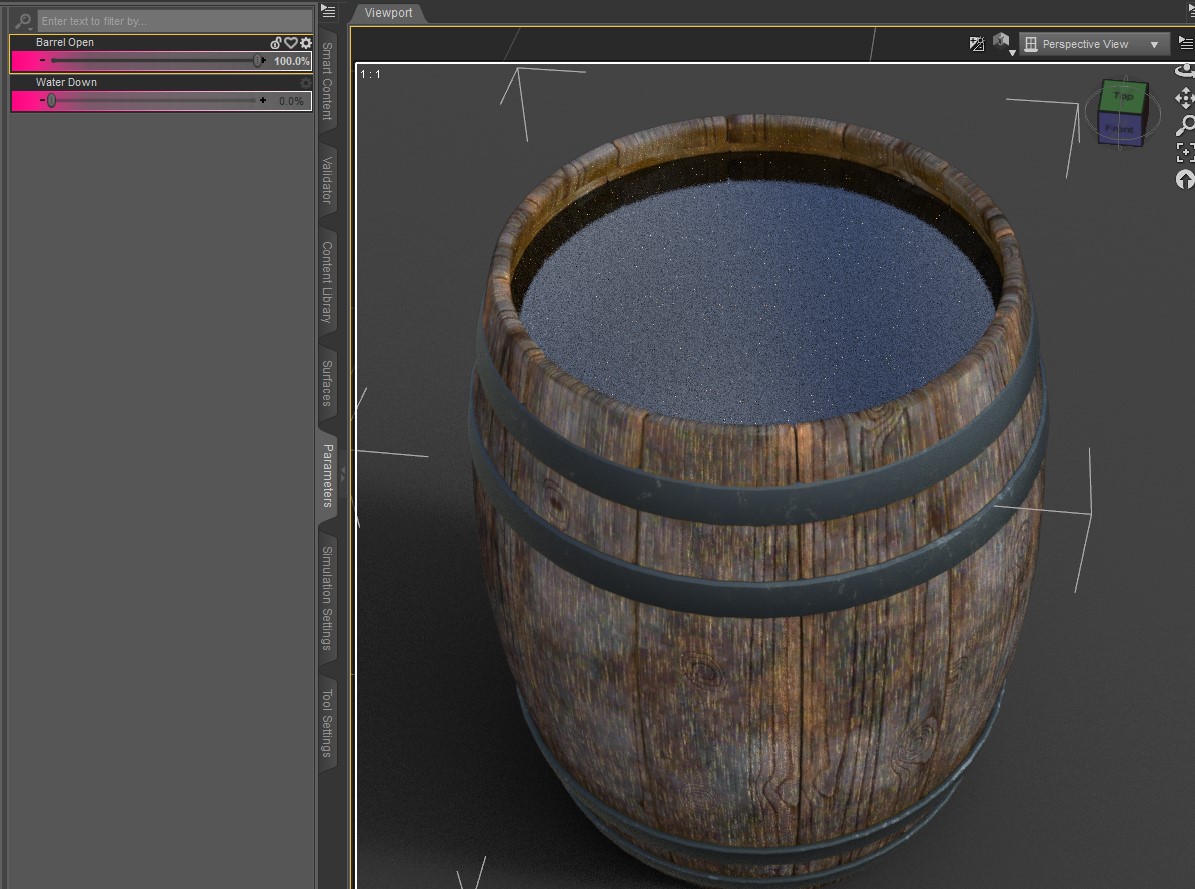
The single barrel should have two morphs. Morph Barrel Open and Morph Water Down. Move the slider Barrel Open to Open the top of the barrel and you will see the water level. Use the Water Down morph to lower the water.
I hope that helps. :)
Edited by user Saturday, November 30, 2024 4:18:42 PM(UTC)
| Reason: Not specified DoctorPervic
|
1 user thanked DoctorPervic for this useful post.
|
|
|
|
Rank: Advanced Member
Joined: 5/20/2020(UTC)
Posts: 64
Was thanked: 25 time(s) in 24 post(s)
|
Thanks for your answer, DoctorPervic! I found the two morphs you showed in your post- they're right where they should be, and they work perfectly. Can't explain how I missed them earlier...
I also tried Davo's suggestion and learned something new so this has been a positive experience for me. Thanks again for the answers!
|
1 user thanked 3DSaga for this useful post.
|
|
|
|
Rank: Advanced Member
Joined: 12/10/2017(UTC)
Posts: 63
Thanks: 24 times
Was thanked: 13 time(s) in 12 post(s)
|
Glad everything worked out. :D Many of my props should have morphs to them in that set. The barn, the ladder, I think the trough, just select the prop and go to the properties section and see if they have a morph or not. :) DoctorPervic
|
|
|
|
|
|
Renderotica
»
Store Products
»
Product Support
»
DoctorPervic
»
How To Get The Water To Show In A Barnyard Barrel?
Forum Jump
You cannot post new topics in this forum.
You cannot reply to topics in this forum.
You cannot delete your posts in this forum.
You cannot edit your posts in this forum.
You cannot create polls in this forum.
You cannot vote in polls in this forum.