Renderotica
»
Store Products
»
Product Support
»
Meipe
»
Dicktator - Seams and colors not matching
Rank: Member
Joined: 12/3/2020(UTC)
Posts: 26
Was thanked: 1 time(s) in 1 post(s)
|
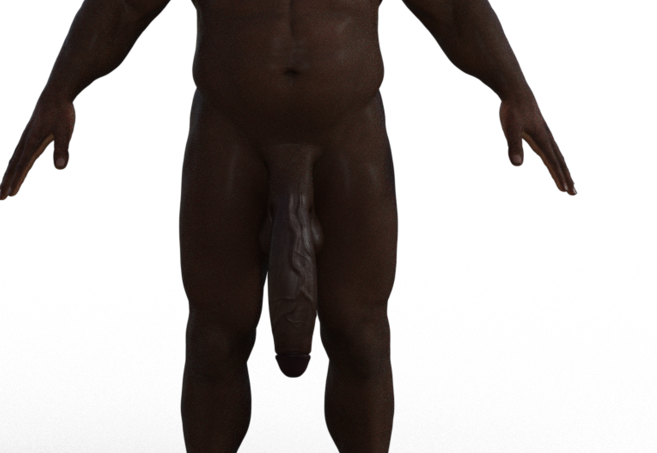
Hey guys, just wondering why the upper part of the shell is not matching the rest of the skin color and how I go about fixing it. Its not the end of the world but you can clearly see that it looks sewed on and not natural. Kinda like Frankenstein lol
|
|
|
|
|
|
Rank: Advanced Member
Joined: 9/15/2012(UTC)
Posts: 1,580
Thanks: 1331 times
Was thanked: 1513 time(s) in 750 post(s)
|
First time I see this bug... maybe check the "Torso_Front" UVs that must be "Dicktator UVs v2" You may also try to copy the shell "Shaft" surface to the "Torso_Front" one and check the result... [right-click on the source surface ->copy selected surface, then right-click on the target surface and paste].
|
|
|
|
|
|
Rank: Member
Joined: 12/3/2020(UTC)
Posts: 26
Was thanked: 1 time(s) in 1 post(s)
|
Sorry I'm fairly new to this so I don't know where I check for the UV's and even if I did I find them I don't know what you mean by "Torso_Front" UVs that must be "Dicktator UVs v2". I tried your 2nd solution and unfortunately that didn't work. If you need further information about the model or such just ask!
Thanks for your time and help!
|
|
|
|
|
|
Rank: Advanced Member
Joined: 9/15/2012(UTC)
Posts: 1,580
Thanks: 1331 times
Was thanked: 1513 time(s) in 750 post(s)
|
Yes please tell me the character you are using Meipe attached the following image(s):
|
|
|
|
|
|
Rank: Member
Joined: 12/3/2020(UTC)
Posts: 26
Was thanked: 1 time(s) in 1 post(s)
|
I can't insert images so I'll send gyazo links instead if that is okey! This is the result I when I follow your instructions. I get these odd white spots on the left and right side. - https://gyazo.com/dcdaa4d24f88e610a5344003e73fee0cFor some odd reason the penis is also white in the filament drawstyle - https://gyazo.com/0b385739b8954ef55fad7d38e8524784The charachter used is Niko 8 in combination with some other charachter morphs. I have also darkened his skin via the base colour tab in the surface section. Please if you need further information then just ask!
|
|
|
|
|
|
Rank: Advanced Member
Joined: 9/15/2012(UTC)
Posts: 1,580
Thanks: 1331 times
Was thanked: 1513 time(s) in 750 post(s)
|
I checked the character and it needs a custom fix. I don't have time for that just now, but I'll try to release it ASAP for the community
|
|
|
|
|
|
Rank: Member
Joined: 12/3/2020(UTC)
Posts: 26
Was thanked: 1 time(s) in 1 post(s)
|
Thank you, it would be highly appreciated!
|
|
|
|
|
|
Rank: Advanced Member
Joined: 9/15/2012(UTC)
Posts: 1,580
Thanks: 1331 times
Was thanked: 1513 time(s) in 750 post(s)
|
Hum, there are not one but two bugs on this character that I've never seen before. I hope I'll be able to figure out a solution, for the moment I'm in the dark... :/
|
|
|
|
|
|
Renderotica
»
Store Products
»
Product Support
»
Meipe
»
Dicktator - Seams and colors not matching
Forum Jump
You cannot post new topics in this forum.
You cannot reply to topics in this forum.
You cannot delete your posts in this forum.
You cannot edit your posts in this forum.
You cannot create polls in this forum.
You cannot vote in polls in this forum.