Renderotica
»
Store Products
»
Product Support
»
Meipe
»
Pushing the breasts down? (Breastacular)
Rank: Member
Joined: 3/30/2020(UTC)
Posts: 10
Thanks: 1 times
|
Hey, I'm new to using this tool, I can't seem to get things to work properly atm,
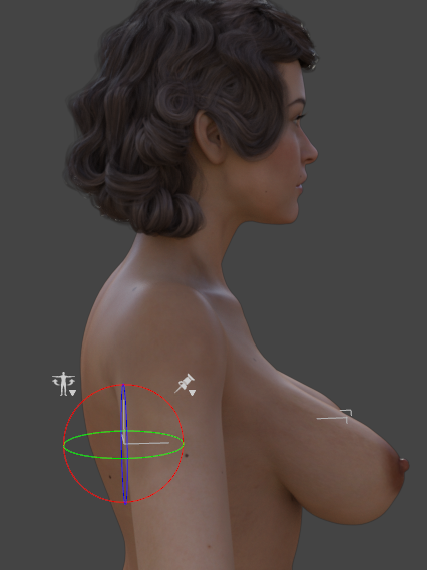
I can't push the breasts downwards , this is natural 0l, How do I go about making them look a bit more natural ? Do i need to mess with the bones to sort this? Btw , Collisions I have no clue about either, Many thanks. OP
|
|
|
|
|
|
Rank: Advanced Member
Joined: 6/14/2017(UTC)
Posts: 159
Thanks: 177 times
Was thanked: 69 time(s) in 41 post(s)
|
Rotate the left and right pectoral down. Also use the natural 9 morph found in the thread www.renderotica.com/comm...&m=478614#post478614
|
|
|
|
|
|
Rank: Advanced Member
Joined: 2/14/2016(UTC)
Posts: 677
Thanks: 35 times
Was thanked: 373 time(s) in 290 post(s)
|
Also as you are asking about breastacular, don't forget you can also use the left and right breast bones in addition to the pectoral bones
|
|
|
|
|
|
Rank: Member
Joined: 3/30/2020(UTC)
Posts: 10
Thanks: 1 times
|
Originally Posted by: Cryphius3DX 
I appreciate the info, I will try to mess with the bones and get the breasts to settle a bit. The natural morph is pretty hefty haha I will add a bit to it , see if it helps.
|
|
|
|
|
|
Rank: Member
Joined: 3/30/2020(UTC)
Posts: 10
Thanks: 1 times
|
Originally Posted by: BrotherHades
Also as you are asking about breastacular, don't forget you can also use the left and right breast bones in addition to the pectoral bones
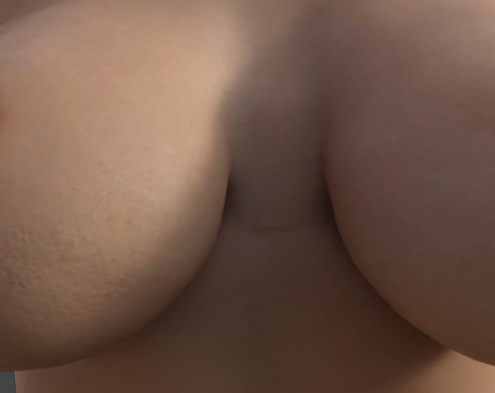
tried both bones they kind of help but cause a dent in the centre of the breasts
|
|
|
|
|
|
Rank: Advanced Member
Joined: 2/14/2016(UTC)
Posts: 677
Thanks: 35 times
Was thanked: 373 time(s) in 290 post(s)
|
Another tip, all the presets for Breastacular are applying the morphs at 100%, but don't forget that the presets represent a morph dial available under the shaping tab or under the parameter tab, and using the dials you can adjust the morph to less than 100%
As for the dent it is largely due to how the mesh is made, being hollow it allows bends and twisting to distort the mesh in ways that doesn't happen in real life because of the underlying muscles and organs. Sadly there isn't much that can be done with the current tool set in Daz Studio easily. You might be able to use dformers or something like that, (Things like what you show make me wish DS had Poser's morph brush or a similar system) but keep in mind that dformers are not the easiest tool to use, but if you can get them set right they can be very useful in fixing mesh distortions (My issue has always been getting the dformer to only affect the areas I need it to work on, like I said it would be great if Daz Studio had a morph brush to make corrections with, as dformers aren't a very precise tool)
|
 2 users thanked BrotherHades for this useful post.
|
|
|
|
Rank: Advanced Member
Joined: 3/14/2013(UTC)
Posts: 410
Thanks: 542 times
Was thanked: 158 time(s) in 133 post(s)
|
I've found a way to make them lie down some more (using Breastacular.) But it's a bit of a hack.
Bend the lower chest forward, and then the upper chest (which moves the arms, but not the breasts) back. Edited by user Friday, December 4, 2020 1:06:54 PM(UTC)
| Reason: Not specified Zeppelin attached the following image(s):
|
|
|
|
|
|
Rank: Advanced Member
Joined: 6/14/2017(UTC)
Posts: 159
Thanks: 177 times
Was thanked: 69 time(s) in 41 post(s)
|
Its definitely possible with breastacular and the natural 9 morph. I never use it at 100%. I use natural 9 between 40% and 60% usually. I bend the pectoral and breast bones, i use the standard cleavage morph, and i tweak the scale of the breasts on the individual axes. It also depends on how big your character is. Breast size depends a lot on how wide the ribcage is and also how wide the breast is where it attaches to the chest. The biggest breasts are the ones that are WIDE, not really rounder.
|
1 user thanked Cryphius3DX for this useful post.
|
|
|
|
Rank: Advanced Member
Joined: 3/14/2013(UTC)
Posts: 410
Thanks: 542 times
Was thanked: 158 time(s) in 133 post(s)
|
Originally Posted by: Cryphius3DX
Thanks for the link, I downloaded the zip file, it contained the data files, which I have installed. How do you access the morph?
|
|
|
|
|
|
Rank: Advanced Member
Joined: 2/14/2016(UTC)
Posts: 677
Thanks: 35 times
Was thanked: 373 time(s) in 290 post(s)
|
Originally Posted by: Zeppelin
Originally Posted by: Cryphius3DX
Thanks for the link, I downloaded the zip file, it contained the data files, which I have installed. How do you access the morph?
If nothing else, if the morph data files were all that was included, it should at least show up as a dial under either the shaping tab or parameters tab. I have actually seen morph only sets show up in either tab depending on how the creator set the morphs up.
|
|
|
|
|
|
Rank: Advanced Member
Joined: 3/14/2013(UTC)
Posts: 410
Thanks: 542 times
Was thanked: 158 time(s) in 133 post(s)
|
Originally Posted by: BrotherHades
If nothing else, if the morph data files were all that was included, it should at least show up as a dial under either the shaping tab or parameters tab. I have actually seen morph only sets show up in either tab depending on how the creator set the morphs up.
I see the Morph Dial, but it has no affect. The icon is missing. Maybe Meipe will advise Zeppelin attached the following image(s):
|
|
|
|
|
|
Rank: Advanced Member
Joined: 3/14/2013(UTC)
Posts: 410
Thanks: 542 times
Was thanked: 158 time(s) in 133 post(s)
|
I retraced my footsteps, and it seems there was an installation error. My bad! It works now. Meipe, Thanks So much for this morph!!!!!
|
|
|
|
|
|
Rank: Advanced Member
Joined: 3/14/2013(UTC)
Posts: 410
Thanks: 542 times
Was thanked: 158 time(s) in 133 post(s)
|
Originally Posted by: orangepeel
tried both bones they kind of help but cause a dent in the centre of the breasts
Try adjusting the Sternum Width, and, if you have Breast Control for G8, there are Parameter dials for Center Gap Width and Height Edited by user Saturday, December 5, 2020 5:34:53 PM(UTC)
| Reason: Not specified
|
|
|
|
|
|
Rank: Advanced Member
Joined: 6/14/2017(UTC)
Posts: 159
Thanks: 177 times
Was thanked: 69 time(s) in 41 post(s)
|
Originally Posted by: Zeppelin
I see the Morph Dial, but it has no affect. The icon is missing. Maybe Meipe will advise
Yeah he never made an icon. It still works.
|
|
|
|
|
|
Rank: Advanced Member
Joined: 2/14/2016(UTC)
Posts: 677
Thanks: 35 times
Was thanked: 373 time(s) in 290 post(s)
|
Originally Posted by: Cryphius3DX
Originally Posted by: Zeppelin
I see the Morph Dial, but it has no affect. The icon is missing. Maybe Meipe will advise
Yeah he never made an icon. It still works.
I'm wondering if Meipe had the morph added to the Breastacular zip at some point, but the store didn't send an update notification or something? Or maybe it was added as a bonus with Milkaiser. As my Breastacular folder has the preset, morph, and icons for Natural 9. 
|
|
|
|
|
|
Rank: Advanced Member
Joined: 3/14/2013(UTC)
Posts: 410
Thanks: 542 times
Was thanked: 158 time(s) in 133 post(s)
|
The icon shows up, I had it installed incorrectly. All the files are there to have it work and appear correctly
|
|
|
|
|
|
Rank: Member
Joined: 6/14/2023(UTC)
Posts: 13
Thanks: 6 times
Was thanked: 2 time(s) in 2 post(s)
|
I realize this is a really old thread, but I just installed Breastacular (v1.2) and had this same question. I downloaded the zip file and unzipped it into the /users/Public/Documents/My DAZ 3D Library/ folder, but doing so and trying to refresh all files, and even restarting DAZ, I cannot get Natural 9 to show up in the Breast Shapes. Any ideas why this isn't working? Thanks in advance for any and all suggestions.
|
|
|
|
|
|
Rank: Advanced Member
Joined: 3/14/2013(UTC)
Posts: 410
Thanks: 542 times
Was thanked: 158 time(s) in 133 post(s)
|
Meipe included the Natural 9 morph as an add on. It may be in the main package now. You must make sure the data file is installed, and look for it in the Parameters settings
|
1 user thanked Zeppelin for this useful post.
|
|
|
|
Rank: Member
Joined: 6/14/2023(UTC)
Posts: 13
Thanks: 6 times
Was thanked: 2 time(s) in 2 post(s)
|
OK, thanks. I thought that's what I did, but perhaps I screwed up somewhere along the way. I'll retrace my steps and see if I can get it working.
|
|
|
|
|
|
Renderotica
»
Store Products
»
Product Support
»
Meipe
»
Pushing the breasts down? (Breastacular)
Forum Jump
You cannot post new topics in this forum.
You cannot reply to topics in this forum.
You cannot delete your posts in this forum.
You cannot edit your posts in this forum.
You cannot create polls in this forum.
You cannot vote in polls in this forum.