|
|
Rank: Newbie
Joined: 5/26/2019(UTC)
Posts: 9
|
I have an issue.
How do I fix the figure shown in the attached image? This happens with most figures. I get these weird indents and curves in the hip joint area. This happens with both G8/G3 male and female figures. Not just this pose but many poses.
Thanks
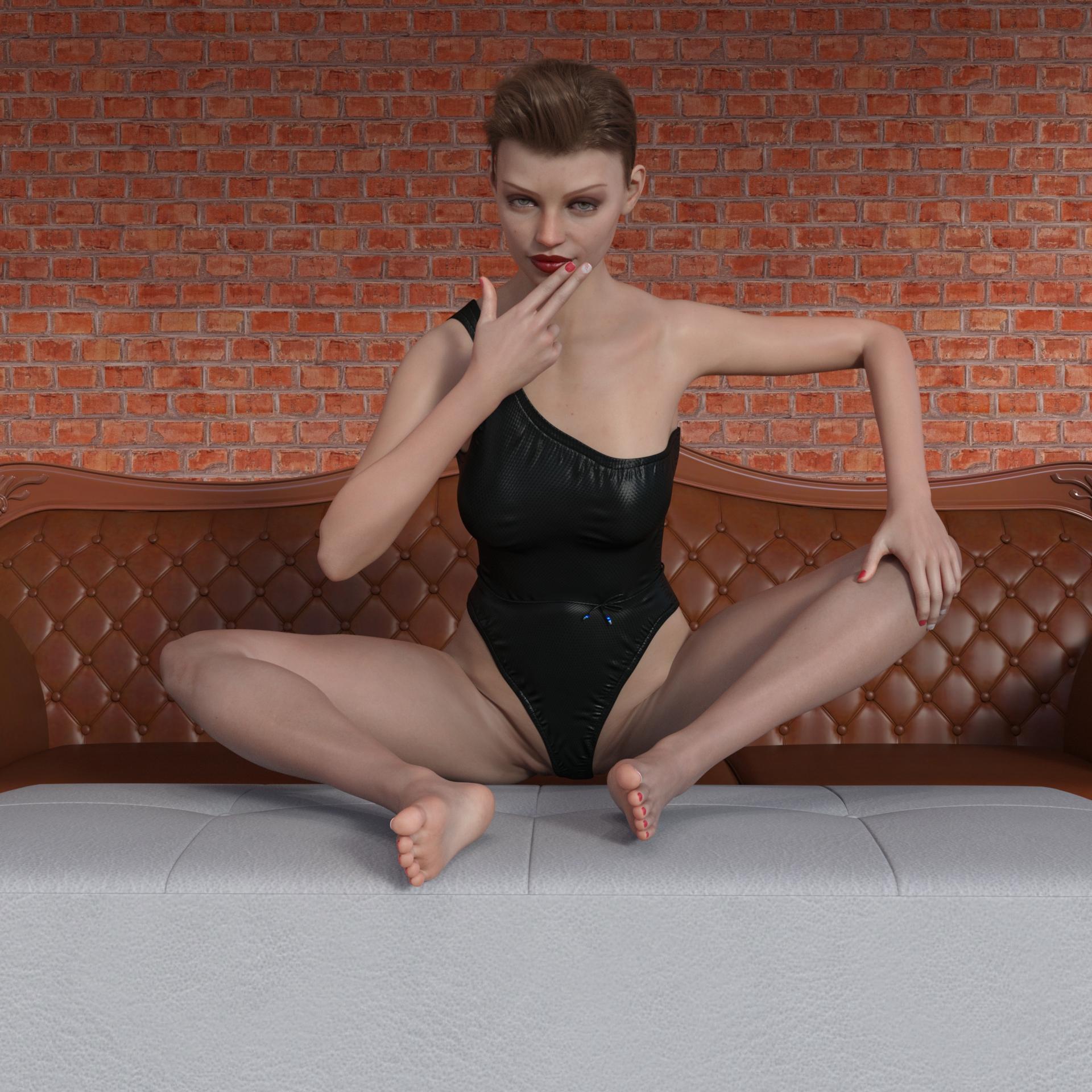
CGI_Models attached the following image(s):
|
|
|
|
|
|
Rank: Advanced Member
Joined: 9/15/2012(UTC)
Posts: 393
Thanks: 707 times
Was thanked: 194 time(s) in 171 post(s)
|
oh yeah, I hate it.
We'll need a JCM god in order to fix that, or better rigging systems coming with better software.
I really have no idea how to fix that. It might be easy, if you only had one transforming parameter, but this occurs on all three of those.
|
|
|
|
|
|
Rank: Advanced Member
Joined: 12/18/2012(UTC)
Posts: 111
Thanks: 51 times
Was thanked: 38 time(s) in 33 post(s)
|
That distortion is, I agree, very annoying. Usually it's a result of extreme rotations in the thigh joints, but it can also appear in relatively "normal" poses. Without the benefit of custom JCMs, there are some solutions, all of which I have used from time to time. In order of ascending difficulty:
1) Change the pose.
2) Change the camera angle to avoid seeing the offending joints.
3) Change the lighting so that the distorted zones are less clear.
4) Use Mesh Grabber to carefully pull the distorted vertices back into shape.
5) Use one or more DForms to adjust the distorted zones.
6) Take the whole model into Hexagon (yuck!!) or Blender and edit the mesh to fix the problem.
My preference is option 4, but the Mesh Grabber plugin does require considerable patience when used on single vertices or edges.
Alternatively, DAZ ... fix the damn models and stop wasting time with Non Fungible Poop. ;)
|
 1 user thanked dsv4600 for this useful post.
|
|
|
|
Rank: Advanced Member
Joined: 5/26/2019(UTC)
Posts: 214
Thanks: 127 times
Was thanked: 68 time(s) in 53 post(s)
|
studysession - This issue is pretty severe, and it only gets worse on the male figures. However, dsv4600 is correct. My go to is unfortunately to just not use the pose or changing the camera so that that portion isn't visible. However, I never thought about using Dformers and Mesh Grabber to try and manually correct it. Thank you dsv4600!
On another side note, I'm learning more about blender, so at some point I might actually be able to attempt option 6 that they've presented.
On an even father side note, I agree - Daz should be focusing on making their existing models and programs better. This Non Fungible stuff that they're working on doesn't seem to involve a majority of the community (from what I'm seeing, I could be wrong). If they put this kind of focus into the making the over all program better or making their base figures work better, then I think they'd more people use their program/a more positive response vs what they've got right now.
|
|
|
|
|
|
Rank: Advanced Member
Joined: 12/18/2012(UTC)
Posts: 111
Thanks: 51 times
Was thanked: 38 time(s) in 33 post(s)
|
Ebonix, if you do try Mesh Grabber, it works best for this operation when set to select vertices or edges. In this case, it's best to set the falloff zone to zero so that only the selected vertices are moved. You may also need to experiment with the orientation of the "gizmo" so that translations are in the correct direction. It does take time, but even some small tweaks can be enough to fix bad distortion enough to make the pose usable. When you're happy, you can save the changes as a morph (on the Mesh Grabber Tool Settings tab, bottom right, "Save") which can then be reused in other similar setups - but that's a whole other story.
Oh, quick warning - when you switch to Mesh Grabber, conforming is turned off. This is especially unsettling if you have Golden Palace or another Geograft loaded, because it no longer fits correctly while the Mesh is being "grabbed". There's no way around that, unfortunately.
And a tip: if you're finding selecting what you want difficult using the Mesh Grabber, you can switch into the Geometry Editor tool and use the various selection tools there - any selection made in the Geometry Editor is carried into the Mesh Grabber and vice versa.
|
2 users thanked dsv4600 for this useful post.
|
|
|
|
Rank: Advanced Member
Joined: 9/15/2012(UTC)
Posts: 166
Thanks: 121 times
Was thanked: 80 time(s) in 65 post(s)
|
Originally Posted by: dsv4600  Ebonix, if you do try Mesh Grabber, it works best for this operation when set to select vertices or edges. In this case, it's best to set the falloff zone to zero so that only the selected vertices are moved. You may also need to experiment with the orientation of the "gizmo" so that translations are in the correct direction. It does take time, but even some small tweaks can be enough to fix bad distortion enough to make the pose usable. When you're happy, you can save the changes as a morph (on the Mesh Grabber Tool Settings tab, bottom right, "Save") which can then be reused in other similar setups - but that's a whole other story.
Oh, quick warning - when you switch to Mesh Grabber, conforming is turned off. This is especially unsettling if you have Golden Palace or another Geograft loaded, because it no longer fits correctly while the Mesh is being "grabbed". There's no way around that, unfortunately.
And a tip: if you're finding selecting what you want difficult using the Mesh Grabber, you can switch into the Geometry Editor tool and use the various selection tools there - any selection made in the Geometry Editor is carried into the Mesh Grabber and vice versa.
Thank you for that last tip, you've just solved my selection frustrations in Mesh Grabber with one sentence :)
|
|
|
|
|
|
Rank: Advanced Member
Joined: 9/15/2012(UTC)
Posts: 393
Thanks: 707 times
Was thanked: 194 time(s) in 171 post(s)
|
This is the reason, why I consider 3d porn as the king discipline of 3d art. No other genre is challenging 3d figure rigging and posing more.
Not even martial arts comes clothes, for their actors are usually dressed.
Another option could be to create your own pose controls.
You create one ERC dial, that poses your limb together with its correction morph to the required target position.
|
|
|
|
|
|
Rank: Newbie
Joined: 5/26/2019(UTC)
Posts: 9
|
Thank you for all the replies. On some parts I seem to understand well but fixing stuff like this, I do not understand that well.
I Have mesh-grabber. I am still learning how to use it and also been learning the geometry editor.
Right now I am glad it is not just me.
Thank you
|
|
|
|
|
|
Rank: Advanced Member
Joined: 9/15/2012(UTC)
Posts: 158
Thanks: 58 times
Was thanked: 113 time(s) in 81 post(s)
|
Genesis figures are already made with huge care, but unfortunately, we can't expect all combinations of rotations, bends, twists, and shapes to blend together flawlessly in all extreme scenarios.
You could create a multi-rotational JCM, that applies when a specific combination of joints act together, even for a specific character, however, that will still create issues when other combinations come into play. There is simply not an all variants solution.
My advice is to just export the posed character, smooth the problematic area in a modeler, and import back as a morph using Reverse Deformations. I like ZBrush for this, Blender and Hexagon are free alternatives.
Actually, I consider it good practice to export the ready-to-render character and refine things to your liking.  DAZ STUDIO USER SINCE 2006
|
|
|
|
|
|
Rank: Advanced Member
Joined: 9/15/2012(UTC)
Posts: 406
Thanks: 32 times
Was thanked: 71 time(s) in 61 post(s)
|
Originally Posted by: studysession
Right now I am glad it is not just me.
Thank you
At some point everyone has to deal with unsightly joint deformations when posing figures. You are definitely not alone.;-)
Originally Posted by: Hellboy
Genesis figures are already made with huge care, but unfortunately, we can't expect all combinations of rotations, bends, twists, and shapes to blend together flawlessly in all extreme scenarios.
So very true. As things stand the DAZ figures have come a long way and will likely continue to advance as long as people continue to use them. Jeezu, I remember the truly horrific joint distortions one encountered when posing the V4 and M4 figures, which predated the various generations of the Genesis figures, and which didn't even use weight maps.
Originally Posted by: Hellboy My advice is to just export the posed character, smooth the problematic area in a modeler, and import back as a morph using Reverse Deformations. I like ZBrush for this, Blender and Hexagon are free alternatives.
Actually, I consider it good practice to export the ready-to-render character and refine things to your liking.
I find myself doing this with every illustration I create in DAZ Studio these days. It is the only way I can make flesh, muscle, and tendon stretch and compress correctly on the figures to create those important bulges and hollows that muscles and tendons form when posing. I am constantly working on improving my sculpting skills in this area.
Originally Posted by: dsv4600 That distortion is, I agree, very annoying. Usually it's a result of extreme rotations in the thigh joints, but it can also appear in relatively "normal" poses. Without the benefit of custom JCMs, there are some solutions, all of which I have used from time to time. In order of ascending difficulty:
1) Change the pose.
2) Change the camera angle to avoid seeing the offending joints.
3) Change the lighting so that the distorted zones are less clear.
4) Use Mesh Grabber to carefully pull the distorted vertices back into shape.
5) Use one or more DForms to adjust the distorted zones.
6) Take the whole model into Hexagon (yuck!!) or Blender and edit the mesh to fix the problem.
My preference is option 4, but the Mesh Grabber plugin does require considerable patience when used on single vertices or edges.
Alternatively, DAZ ... fix the damn models and stop wasting time with Non Fungible Poop. ;)
I've used and continue to use all of these methods to correct joint distortions and wish to mention one more method... Occasionally I have corrected joint distortions in a DAZ Studio renders by painting over or editing them in an image editing program such as Photoshop, GIMP, Painter, Affinity Photo, etc. Use whatever method or combination od methods best works for you.
|
1 user thanked Ciaran for this useful post.
|
|
|
|
Rank: Advanced Member
Joined: 12/18/2012(UTC)
Posts: 111
Thanks: 51 times
Was thanked: 38 time(s) in 33 post(s)
|
Originally Posted by: Ciaran
I've used and continue to use all of these methods to correct joint distortions and wish to mention one more method... Occasionally I have corrected joint distortions in a DAZ Studio renders by painting over or editing them in an image editing program such as Photoshop, GIMP, Painter, Affinity Photo, etc. Use whatever method or combination od methods best works for you.
Absolutely right. I forgot to mention that; and it is, perhaps, the easiest of all if you are well versed in your graphics program. I use Corel Paint Shop Pro, but wish I didn't (it's just what I'm used to) and I would recommend looking into the Scratch Remover tool. You drag it over a mark and it fades in the surrounding pixels to make the mark vanish, like an intelligent Clone Tool. The same thing must exist in Photoshop and GIMP.
That said, if I could spare the time to learn another graphics program I would ditch PSP in a heartbeat; every year they produce expensive updates but they never seem to fix the underlying problems: corrupted image cache preventing program starting, screen updating that sometimes doesn't show what you're changing etc. etc.
But, yes, definitely postworking is an excellent method to fix all types of rendering errors - including distorted joint seams..
|
|
|
|
|
|
Rank: Advanced Member
Joined: 9/15/2012(UTC)
Posts: 393
Thanks: 707 times
Was thanked: 194 time(s) in 171 post(s)
|
Originally Posted by: dsv4600
Originally Posted by: Ciaran
I've used and continue to use all of these methods to correct joint distortions and wish to mention one more method... Occasionally I have corrected joint distortions in a DAZ Studio renders by painting over or editing them in an image editing program such as Photoshop, GIMP, Painter, Affinity Photo, etc. Use whatever method or combination od methods best works for you.
Absolutely right. I forgot to mention that; and it is, perhaps, the easiest of all if you are well versed in your graphics program. I use Corel Paint Shop Pro, but wish I didn't (it's just what I'm used to) and I would recommend looking into the Scratch Remover tool. You drag it over a mark and it fades in the surrounding pixels to make the mark vanish, like an intelligent Clone Tool. The same thing must exist in Photoshop and GIMP.
That said, if I could spare the time to learn another graphics program I would ditch PSP in a heartbeat; every year they produce expensive updates but they never seem to fix the underlying problems: corrupted image cache preventing program starting, screen updating that sometimes doesn't show what you're changing etc. etc.
But, yes, definitely postworking is an excellent method to fix all types of rendering errors - including distorted joint seams..
I know, people do this, but this is a no go for me.
Reminds me of dark Poser ages, where this has been the way to make your character look decent.
It isn't, but it feels like cheating to me, bad enough, I have to resculp stuff.
I just don't want to do paint overs.
|
|
|
|
|
|
Rank: Advanced Member
Joined: 9/15/2012(UTC)
Posts: 406
Thanks: 32 times
Was thanked: 71 time(s) in 61 post(s)
|
Originally Posted by: Masterstroke
Originally Posted by: dsv4600
Originally Posted by: Ciaran
I've used and continue to use all of these methods to correct joint distortions and wish to mention one more method... Occasionally I have corrected joint distortions in a DAZ Studio renders by painting over or editing them in an image editing program such as Photoshop, GIMP, Painter, Affinity Photo, etc. Use whatever method or combination od methods best works for you.
Absolutely right. I forgot to mention that; and it is, perhaps, the easiest of all if you are well versed in your graphics program. I use Corel Paint Shop Pro, but wish I didn't (it's just what I'm used to) and I would recommend looking into the Scratch Remover tool. You drag it over a mark and it fades in the surrounding pixels to make the mark vanish, like an intelligent Clone Tool. The same thing must exist in Photoshop and GIMP.
That said, if I could spare the time to learn another graphics program I would ditch PSP in a heartbeat; every year they produce expensive updates but they never seem to fix the underlying problems: corrupted image cache preventing program starting, screen updating that sometimes doesn't show what you're changing etc. etc.
But, yes, definitely postworking is an excellent method to fix all types of rendering errors - including distorted joint seams..
I know, people do this, but this is a no go for me.
There are various logical an valid reasons for why many people don't or can't do this... such as not having the software, knowledge, skill or patients to edit a render with an image editor. Humans are also naturally lazy and want quick and easy solutions to problems. I know I would love it if there was less work involved in creating a good illustration, but good Artwork is WORK. It isn't easy.
Sorry if I'm stating the obvious.
All the same, it's OK if it is a "No Go" for you.
Originally Posted by: Masterstroke Reminds me of dark Poser ages, where this has been the way to make your character look decent.
I'm afraid those so called "Poser Dark Ages" never went away. :-) ...They have brightened a bit, though.
Originally Posted by: Masterstroke It isn't, but it feels like cheating to me, bad enough, I have to resculp stuff.
I just don't want to do paint overs.
I've run into this idea regarding various tools and methods of creating artwork as "cheats" all my life, and you are correct that image editing is not a cheat. (I know there is an argument against that statement, but I don't consider it an argument worth having.) "Image Editing" is simply another tool in the artist's toolbox. The tools are not as important as what you do with them.
If "doing paint overs" is cheating... Then by that logic isn't using DAZ Studio and DAZ figures cheating. Shouldn't you be modeling, rigging, and texturing your figures from scratch. In truth, artists have been seeking out and using quicker and easier methods of doing things throughout history. Again, it's the skill, creativity, and beauty of the finished artwork that counts, and not so much the methods and tools used to achieve it. (Yes, I know there is something to be said for the impressiveness of an artist who can work from "scratch". I wish I could do everything from scratch, but it would probably take another lifetime.)
SORRY... I didn't mean to berate you or anyone else. At least, I hope it didn't come across that way. Apologies and Best Regards!
|
|
|
|
|
|
Rank: Advanced Member
Joined: 1/16/2016(UTC)
Posts: 332
Thanks: 15 times
Was thanked: 122 time(s) in 77 post(s)
|
I had a couple of free minutes, so I whipped up a couple of small g8f jcm's to fix the extreme thigh poses with the legs are spread and the hip area gets a bit weird.
You can download it from my Google Drive, just install into your main content folder. The master controller is under Actor/Legs/Real World -> Snarl Thigh Controller. Use this to control the amount.
You can download from here: https://drive.google.com...55pTZXL/view?usp=sharing
This is being provided "As is".
|
4 users thanked SnarltheWerewolf for this useful post.
|
|
|
|
Rank: Advanced Member
Joined: 9/15/2012(UTC)
Posts: 621
Thanks: 304 times
Was thanked: 396 time(s) in 255 post(s)
|
Snarl, that is AWESOME! Such a simple thing, but so needed. Thank you!
|
|
|
|
|
|
Rank: Advanced Member
Joined: 1/16/2016(UTC)
Posts: 332
Thanks: 15 times
Was thanked: 122 time(s) in 77 post(s)
|
Originally Posted by: matt
Snarl, that is AWESOME! Such a simple thing, but so needed. Thank you!
You're welcome! Hopefully it'll bring you some use.
|
|
|
|
|
|
Rank: Advanced Member
Joined: 9/15/2012(UTC)
Posts: 393
Thanks: 707 times
Was thanked: 194 time(s) in 171 post(s)
|
I don't mind, making a render more interesting by using post work,
I has nothing to do with being lazy either.
I just hate to fake something, that my 3d character software cannot do.
Yes, I am a purist and proud of it. As long there is no solution for having 100% anatomically correct 3d figures with 100% anatomically correct joint bendings, I will never be fully satisfied with any software.
Off and on, you can see some promising tech demos, but they won 't ever seem to make it into consumer software.
Highly frustrating., because accuracy would be most important, especially for doing erotic art.
Just in case, someone is planing to do animations,
good luck and lots of patience by painting over 24 frames per second in your home made 25 minutes movie.
Well, maybe you are all fine with that, o.k., but I am not.
I just think, software companies won't improve their products, as long as there is no demand for it.
We have seen this on Poser, now. Poser dropped from the nr. One company to nr. Three behind Iclone and Daz Studio.
If a software like Blender will fill that gab, than DAZ and Rendo will fall back as Asset providers only.
(edited) Edited by user Monday, January 3, 2022 5:32:49 AM(UTC)
| Reason: Not specified
|
|
|
|
|
|
Rank: Advanced Member
Joined: 9/15/2012(UTC)
Posts: 406
Thanks: 32 times
Was thanked: 71 time(s) in 61 post(s)
|
@ SnarltheWerewolf... Thank you for working on those JCM's. and making them available.
@ Masterstroke... Sorry. I wasn't calling you lazy. I was generalizing about humans. Even I can be lazy at times. My "pet peeves" with regard to this type of digital art kind of got the better of me with that post. I can most definitely understand about being a "purist", and meant to comment about that in the post, but it slipped my mind.
|
1 user thanked Ciaran for this useful post.
|
|
|
|
Forum Jump
You cannot post new topics in this forum.
You cannot reply to topics in this forum.
You cannot delete your posts in this forum.
You cannot edit your posts in this forum.
You cannot create polls in this forum.
You cannot vote in polls in this forum.
|