Renderotica
»
General
»
General Discussion
»
Thinking about upgrading my RAM Memory, how much
Rank: Advanced Member
Joined: 9/15/2012(UTC)
Posts: 378
Was thanked: 14 time(s) in 7 post(s)
|
I've decided to upgrade my ram memory, just how much would I need to handle the genesis figures. Right now I am using V4 and M4 with no problems , but as soon as I load a Genesis figure my render times triple at the very least. I was thinking of getting at least 16 Gigs, would that help?
I currently have 4 gigs...
Thanks Butch
 
{I know, it's kinda of silly but I like the little guys. They do show what I am thinking, and a picture is worth a thousand words....}
|
|
|
|
|
|
Rank: Advanced Member
Joined: 9/15/2012(UTC)
Posts: 628
Thanks: 305 times
Was thanked: 400 time(s) in 257 post(s)
|
Originally Posted by: Butch 
I've decided to upgrade my ram memory, just how much would I need to handle the genesis figures. Right now I am using V4 and M4 with no problems , but as soon as I load a Genesis figure my render times triple at the very least. I was thinking of getting at least 16 Gigs, would that help?
I currently have 4 gigs...
Thanks Butch
{I know, it's kinda of silly but I like the little guys. They do show what I am thinking, and a picture is worth a thousand words....}
What are your computer specs? Laptop or desktop? Age of the motherboard, type of motherboard, type of video card and how much Vram it has all will play into it.
For example, some older mobo's will allow you to plug in 64GB or more of RAM, but they will only "see" around 16GB because of their older design.
For the record, I run 16GB, and I can render multiple G8's in a scene, but I'm also running a GTX1080i graphics card with 8GB of Vram.
EDIT: I should add, if you're going to be rendering with iray, an nvidia card is a must, the more Vram you can get, the better.
|
|
|
|
|
|
Rank: Advanced Member
Joined: 9/23/2020(UTC)
Posts: 412
Thanks: 120 times
Was thanked: 235 time(s) in 207 post(s)
|
Hi Butch, It's not just about RAM ... but also VRAM (graphics card). You can have - literally - tons of RAM ... but with a slow graphics card (that may not even support Iray) it doesn't do very much. An example: My old PC (which I used for ripping videos, among other things) has 16 GB, but no Nvidia graphics card. Ripping was very fast ... but DAZ Iray rendering is a pain in the ar....m ;-) Perhaps the following link will help you with your decision: https://www.daz3d.com/fo...aster-and-better-renders
|
|
|
|
|
|
Rank: Newbie
Joined: 5/20/2019(UTC)
Posts: 4
|
Hey Butch
As others have said - at least 16Gb (I have 64GB). A graphic card is also important. I've already started to think about my new upgrade (in a few years)
Also depends on if you are using a desktop or laptop. Desktops are easier to upgrade, but if a system that has only 4GB, your motherboard might not be able to operate with a higher amount of RAM. With laptops now days, most come with at 8GB, but 16GB is better. I have a laptop that has 8GB that I use to use, but it takes a longer to render images.
|
|
|
|
|
|
Rank: Advanced Member
Joined: 1/4/2019(UTC)
Posts: 78
Thanks: 1 times
Was thanked: 50 time(s) in 36 post(s)
|
My experience with DAZ has been quite good but I am still learning. As with performance it can be hit and miss depending on what environment, and the type of characters, hair types and if the skin is either PBR or UBR and what render settings I use. I do have a GTX 1070 8GB VRAM and 32GB DDR4 RAM with XMP as I upgraded the machine recently to 11th gen. However that was really only because I wanted to get more performance from it. Generally though 16GB DDR4 with XMP plus an NVIDIA 10 or 20 series with at least 8GB VRAM and up to date drivers will do a good job in your renders. However the more characters and assets you use the more resources gets taken up so you'll still need to balance the quality and performance in the render settings to get the best image. Edited by user Friday, February 3, 2023 12:01:57 PM(UTC)
| Reason: Not specified
|
|
|
|
|
|
Rank: Advanced Member
Joined: 9/15/2012(UTC)
Posts: 69
Thanks: 39 times
Was thanked: 29 time(s) in 21 post(s)
|
My old PC had a 8 year old Intel i7, a Nvidia Geforce RTX 2080 (Gaming OC) with 8 GB of Ram and 16GB of System Ram.
That was good enough to work with 2-3 Genesis 8 figures and a few items in the background. But often I had to run scene Optimizer to reduce texture sizes to render in Iray with GPU only. So the limiting factor was more the Grafics Cards RAM not the system RAM. If you plan to use genesis 9 instead of 8 you need more GPU RAM.
I now run a RTX 3090ti with 24GB or GPU RAM in my new machine. That additional GPU RAM helps a lot.
You wrote "but as soon as I load a Genesis figure my render times triple at the very least. "
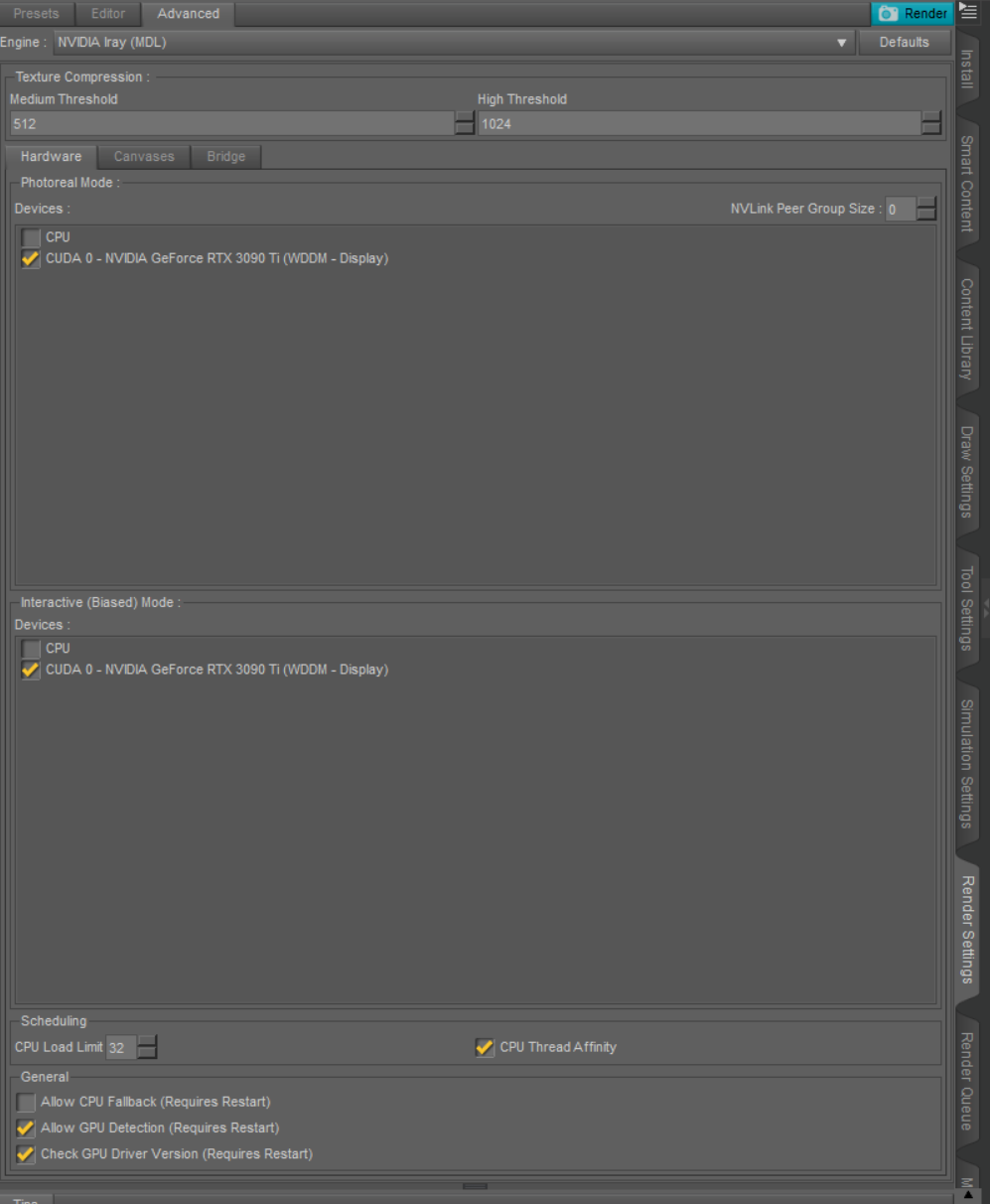
Is it possible that you run out of GPU RAM? Because then Studio IRAY will not render using the GPU but the CPU instead, which increases the render times drastically.
You can test if that is the case if you disallow the CPU Fallback in the settings. In that case the render process should not start at all, if you run out of GPU RAM.
Settings like this:
Edited by user Monday, February 6, 2023 4:10:37 AM(UTC)
| Reason: Added Image
|
|
|
|
|
|
Rank: Advanced Member
Joined: 9/15/2012(UTC)
Posts: 57
Thanks: 26 times
Was thanked: 15 time(s) in 10 post(s)
|
Genesis 8 and 9 texture maps are huge and eat up a ton of RAM... as well as newer scene sets.
I use this Optimizer utility which can chop texture sizes way down.
The Nvidia Graphics cards can cost as much as a car, so if you don't have the GPU memory... this utility helps a lot
https://www.daz3d.com/scene-optimizer
|
|
|
|
|
|
Renderotica
»
General
»
General Discussion
»
Thinking about upgrading my RAM Memory, how much
Forum Jump
You cannot post new topics in this forum.
You cannot reply to topics in this forum.
You cannot delete your posts in this forum.
You cannot edit your posts in this forum.
You cannot create polls in this forum.
You cannot vote in polls in this forum.