Originally Posted by: fred333 
 so, prior to the change I was able to go into Catalog, Advanced Search, Software and choose Poser and get a list of Poser related items. Post the change, doing the same thing, only 3 out of the first 100 items are Poser related and not the first three either. That to me suggests it's broken when before it wasn't.
At the moment, the Advanced Search has stopped working. We are looking into this to determine why and hope to have it working properly again soon. In the meantime, here are some instructions on how to search for Poser only products using the left menu, Refine By selections.
Click on the +REFINE BY link under the title "3d Content", to open the dropdown menu.
Choose Poser under Software preferences then click the OK button to the right.

Next, collapse the dropdown menu by clicking on the -REFINE BY link.
You will notice that the displayed products will have changed, but you will also still see Comics in the mix. These aren't supposed to be doing this and we are also working on fixing this part of the search as well. So to ensure the comics are removed,
Expand the dropdown menu by clicking the +REFINE BY under the Comics, Artwork & Games title.
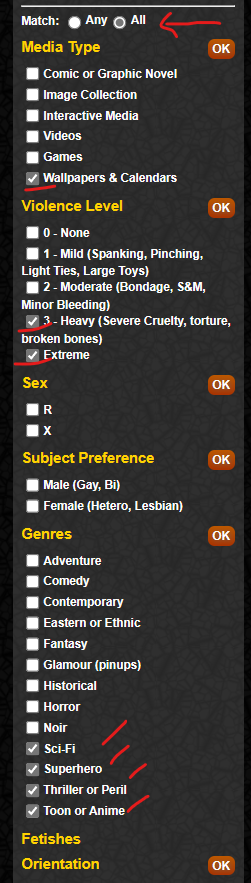
Then select Match: All
Then select a number of random check boxes. By selecting Match All, it will be looking for all comics that have ALL of the preferences turned on, so by choosing a number of checkboxes that don't go together, you should be able to exclude ALL the comics. Below is an example of the selections I made to remove the comics from my display.
Edited by user Thursday, October 24, 2024 6:13:35 PM(UTC)
| Reason: Not specified
RangerRabbit attached the following image(s):
RangerRabbit
Renderotica Management